Screen Readers
Screen reading software operates a speech synthesizer, which voices the contents of a computer screen. Screen readers are helpful in navigating programs and word processing documents. The user, through windows-based keystrokes, navigates the electronic environment, hearing the prompts, dialog boxes, etc. Screen readers highlight words as they are read by the computer. Screen readers are compatible with word processing, spreadsheet, commercial web browsers and database packages and can be used in conjunction with screen enlargement and Braille output products.
Window Eyes is a screen reading software which converts components of the Windows operating system into synthesized speech allowing for complete and total access to Windows based computer systems.I...
Add to My Solutions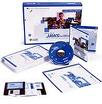
JAWS for Windows is a screen reading software that uses a computer synthesizer and sound card to read all information on the screen aloud. It also has the ability to output information to a refres...
Add to My Solutions
JAWS for Windows is a screen reading software that uses a computer synthesizer and sound card to read all information on the screen aloud. It also has the ability to output information to a refres...
Add to My SolutionsSolution Icons -
Quick Delivery This icon denotes pre-approved assistive technology devices that can be delivered quickly.
Additional Time for Delivery This icon denotes assistive technology devices that may take additional time for CAP to approve and deliver.
NMCI Certified This icon denotes assistive technology devices that are certified by the Navy Marine Corps Intranet.
Device Demonstration This icon denotes assistive technology devices that are available for demonstration.
Green Product This icon denotes assistive technology devices that are designated as a green product.
Technology Solutions This icon denotes assistive technology solutions that may have technical services, installation or upgrade options available.